You shouldn't be rebuilding the same shipment a third time.

Operations books the load, dispatch works it, and then it reaches you.

app.lanexa.io
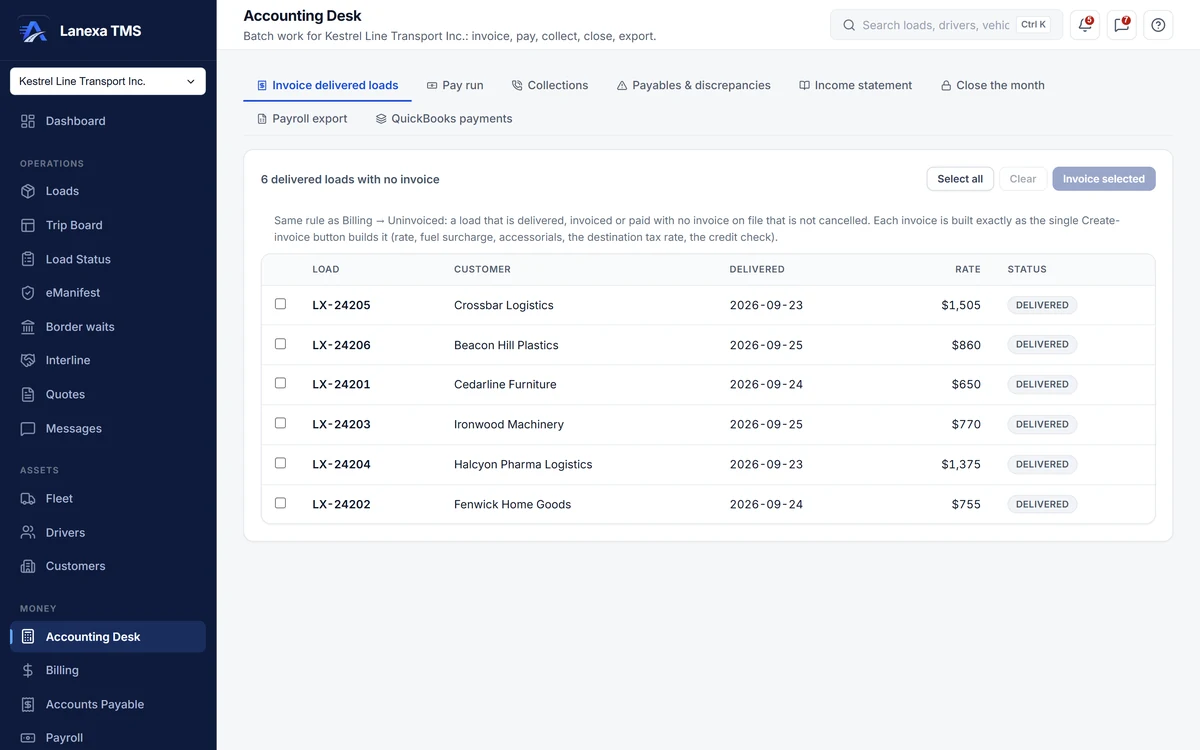
Accounting Desk: delivered loads with no invoice, ready to invoice in one batch (demo data)

What changes for you

  • Delivered loads that never get billedEvery plan · batch invoicing on Start

    Marking a load delivered writes the draft invoice in the same database transaction, or records why it did not. Billing keeps a standing count of delivered loads with no invoice, and the Accounting Desk invoices every one of them in a batch through the same path as the single button.

  • Invoices that come back unpaidStart and up

    Set a customer's required documents and the invoice is not written until they are on the load. The invoice goes out with its document packet, and the exact PDF sent is archived with a digital fingerprint. A detention radar sets stop dwell against each customer's free hours and hourly rate, ready to bill in one click.

  • Carrier bills paid as sentStart and up

    Accounts payable takes each carrier bill from entered to approved to paid, with an approval step of its own. A bill above its rate confirmation is held until someone accepts the difference with a written reason, and on Fleet a partner's bill for an interlined load is raised by itself when the partner delivers.

  • Keying everything into the books againQuickBooks push on Start · general ledger on Fleet

    From Start, invoices, payments and carrier bills push one way into QuickBooks Online. On Fleet, the general ledger writes itself from every invoice, payment, carrier bill, paid settlement and verified fuel receipt — nobody types a journal entry. A Health panel runs eight reconciliations that name the exact documents that disagree, and a weekly cash forecast shows open invoices by due date, approved bills and approved payroll.

  • Corrections that leave the books wrongEvery plan · period close on Start

    A paid invoice is final: adjusting it takes a credit memo, and a void needs a written reason. Money fields on invoices and bills freeze three days after they are committed; after that a correction is a new document or an amendment with a reason. Months can be closed, and only a controller or administrator can hard-close or reopen one.

Your plan: Fleet

Early bird −50% · first 12 months

$499 /month (US$349)

$199.50 CAD /month

≈ US$140 /month

30 days free, then $2,394 (US$1,676) for your first year

$399 (US$279) covers your first 10 trucks, then $40 (US$28) per active truck

  • Renews at $4,788/year (US$3,352)
  • You save $2,845.50 (US$1,992) vs monthly

Monthly billing, US dollars and more trucks on the pricing page

10 trucks and up
  • Everything in Start
  • General ledger + weekly cash forecast
  • Border Desk for ACE and ACI packets
  • Live GPS from Samsara or Geotab
  • Interline, on-call alerts, Ask Lanexa
Start free trial 30-day free trial · no card required
Everything in Fleet

Fleet adds the general ledger — posting itself from every money document — with reconciliations, a weekly cash forecast, and payroll ledgers for escrow, loans and charge-backs.

  • General ledger, period close and a weekly cash forecast
  • Payroll ledgers — escrow, loans and charge-backs — and team pay splits
  • Live GPS from a connected Samsara or Geotab account
  • Border Desk — ACE and ACI packets, ready to file
  • Notification rules, an on-call rota and SLA escalation
  • Voice alert calls for critical alerts
  • AI daily brief, and Ask Lanexa — a question in English becomes a governed report
  • Interline desk for work given to partner carriers

CAD $399 (US$279) covers the first 10 trucks, then $40 (US$28) per active truck · An active truck is a power unit on at least one load that month · A truck parked all month is not billed · 5,000 texts fair use · 500 carrier checks a day

Also consider Start · from CAD $59.50/mo (US$42)

More, when you want it

The modules you'd use6
  • Billing — Receivables: invoices, payments, collections, credit memos and factoring.
  • Accounts Payable — Carrier bills from entered to paid, checked against the rate confirmation.
  • Accounting Desk — The month's work as queues: batch invoicing, collections, pay periods, close.
  • Ledger — The double-entry books, reconciliations and the weekly cash forecast (Fleet).
  • Payroll — Settlements built from the trip, approved by a second person.
  • Reports — Receivables aging and the fixed reports your accountant asks for.
What a accounting can and cannot do
  • Controller — the full books: receivables, payables, settlements, the ledger and period close
  • Accounting — day-to-day receivables and payables with money visible: invoices, payments, voids, credit memos and bill approval
  • Billing clerk — create and send invoices, and apply cash
  • A billing clerk cannot void an invoice or issue a credit memo
  • An A/P clerk cannot approve a bill — approval is a separate step
  • The person who builds a settlement run cannot approve it
  • Accounting roles cannot book or dispatch loads

How does Lanexa work with QuickBooks?

From Start, invoices, payments and carrier bills go straight into QuickBooks Online.

Every plan can also export the books for your accountant.

How do I correct a figure in the ledger?

Correct the document. On Fleet the general ledger is written by the documents themselves — invoices, payments, carrier bills, paid settlements, verified fuel receipts and filed IFTA returns.

If a figure is wrong, you correct the document with a void, a credit memo or the missing payment, and the ledger reposts itself.

Who can void an invoice?

The accounting, controller and administrator roles.

A billing clerk can create, send and take payment on invoices but cannot void one or issue a credit memo, and every void needs a written reason. A paid invoice cannot be voided at all — it takes a credit memo.

Does Lanexa handle driver pay?

Yes, from Start. Pay profiles hold each driver's rules; a settlement run builds itemised pay lines from delivered loads, finished trips, dock time and approved fuel receipts; a second person approves it; and payroll exports to your bureau with names and GL codes.

On Fleet a paid settlement posts to the ledger.

Check and approve. Stop retyping.