You are the integration layer. You shouldn't have to be.

A dispatcher books loads, assigns drivers and trucks, moves jobs forward and farms work out — and spends much of the day retyping between a board, an inbox, a portal and a phone.

app.lanexa.io
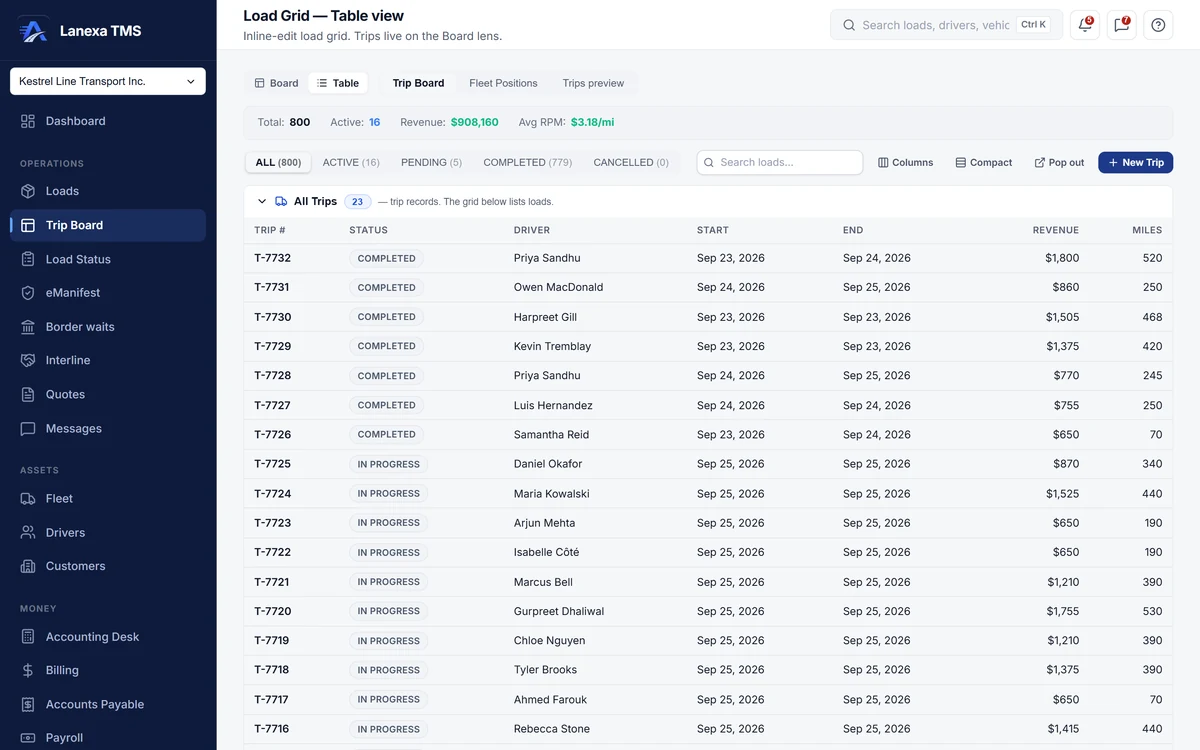
Load grid table view listing trips with driver, status, start and end dates, revenue and miles (demo data)

What changes for you

  • Typing in the rate confirmationStart and up

    Upload the rate confirmation PDF in the booking sheet and AI import pre-fills the load. The form is the review step: nothing saves until you do. And a re-sent rate confirmation cannot book the same job twice — a duplicate-tender guard refuses a re-used load number for the same customer.

  • The board lives in your headStart and up

    The Load Status wall shows every load as kanban, map or timeline; the map marks reported positions where an ELD is connected and planned ones otherwise. The Trip Board puts live trips over the pool of loads nobody is driving yet, and completing a stop on the run sheet moves the load forward.

  • Assigning the wrong driverStart and up

    The driver picker lists available drivers first and sinks anyone on leave to the bottom, asking you to confirm before you assign them anyway. A load tendered to a partner carrier will not take your own driver, and the database refuses to dispatch a load with no customer attached.

  • Chasing drivers for paperworkStart and up · WhatsApp add-on

    Text a driver from inside the load on your company number; the reply lands on that load's thread, and the inbox sorts by what needs a reply rather than what is unread. Send a document request link and the driver or receiver uploads the missing paper from a phone, filed on the load as that document. With the WhatsApp add-on, photos a driver sends in the load's thread wait in a review queue where you name them in one click.

  • “Where is my load?”Every plan

    Every load can publish a tracking link your customer opens with no account and no login. Live CBP and CBSA commercial booth waits, refreshed every 30 minutes, tell you which crossing to plan on before you commit.

Your plan: Start

Early bird −50% · first 12 months

$149 /month (US$104)

$59.50 CAD /month

≈ US$42 /month

30 days free, then $714 (US$500) for your first year

  • Renews at $1,428/year (US$1,000)
  • You save $850.50 (US$595) vs monthly

Monthly billing, US dollars and more trucks on the pricing page

2 to 9 trucks
  • Dispatch board and Trip Board
  • Driver texting on your company number
  • Driver pay and settlements
  • Accounts payable + QuickBooks push
  • Book a load from a rate-con PDF
Start free trial 30-day free trial · no card required
Everything in Start

Start is where dispatch begins: the dispatch board, Trip Board, Load Status wall and load grid, driver texting on a company number and AI rate-confirmation import — with unlimited office users, so every dispatcher has their own login.

  • Dispatch board, Trip Board, Load Status wall and the spreadsheet load grid
  • Driver texting by SMS on a company phone number
  • Driver pay, settlement runs and payroll export
  • Accounts payable, with carrier bill versus rate-confirmation review
  • QuickBooks Online push — invoices, payments and carrier bills
  • AI rate-confirmation import — upload the PDF, review the pre-filled load
  • Quotes with a public acceptance page, lane pricing and win rate
  • Customer credit gate at booking and an EIA-indexed fuel surcharge
  • Analytics boards, the report builder and a tamper-evident audit log

Up to 9 trucks · Unlimited office users · 250 driver texts a month (soft cap) · 25 AI imports a month · 100 carrier checks a day

Also consider Fleet · from CAD $199.50/mo (US$140), first 10 trucks
WhatsApp for your fleet · an add-on on Start and Fleet

More, when you want it

The modules you'd use6
  • Loads — Booking, the load record and AI rate-confirmation import.
  • Load Status — Every load by stage: kanban, map and timeline.
  • Trip Board — Live trips over the load pool, and the run sheet.
  • Messages — Texts, WhatsApp and email on the load, sorted by what needs a reply.
  • Customers — Who pays, their contacts and their credit.
  • Interline — Covering loads with partner carriers.
What a dispatcher can and cannot do
  • Book loads, assign drivers, trucks and trailers, and move jobs through their statuses
  • Tender loads to partner carriers on the interline desk (Fleet)
  • Message drivers from the load, the trip and the inbox
  • See money by default — rates, rate per mile, toll estimates and totals are masked on the load ledger and dashboard for roles without rate visibility
  • Override a customer's credit hold to let a booking through

Can a dispatcher see our rates?

Not by default. The Dispatcher role does not include rate visibility, so rates, margins and totals are masked on the load ledger and dashboard.

Permissions are set per person, per company, so an administrator can grant it to someone who needs it.

Can I build a load from a rate confirmation PDF?

Yes, on Start and up. Upload the PDF in the booking sheet and AI import pre-fills the load; you review it and save.

Do my drivers need an app?

No. Drivers work from texts and links in their phone's browser, or on WhatsApp with the add-on.

There is nothing to install.

Does Lanexa show drivers' hours of service?

Yes, on Fleet. Hours-of-service clocks are read from your connected Samsara or Geotab ELD.

Book the load. The rest follows.