One record.
Quote to payment.
Nothing retyped.

Lanexa is the transportation management system (TMS) for carriers who cross the border. Dispatch, paperwork, invoices and driver pay on the same record, from the quote to the day it's paid.

About 3 minutes to your own account. No sales call, no waiting for access.

  1. 1Plan
  2. 2Where
  3. 3You
  4. 4Review
  5. You’re in

Want a product expert to walk you through it? Ask, before or during your trial.

From CAD $2.50 (US$1.75) a month · 90 days free on Solo, 30 on Start and Fleet

Load record

Lanexa TMS · quote to paid

LoadLX-24817
ShipperHarbourline ProduceMississauga, ON
ConsigneeRidgeway MarketColumbus, OH
PickupMon 06:30
DeliveryTue 13:45
Equipment53' reefer
Weight38,200 lb
Rate · CAD$1,780.00
Miles468
Rate / mile$3.80
Cost / mile$2.96
BorderPeace Bridge · ACE packet ready
Proof of deliveryBOL signed · 3 photos
InvoiceINV-10482 · drafted on delivery
  1. Quote
  2. Load
  3. Trip
  4. Border
  5. Proof
  6. Invoice
  7. Paid
Sample load. Names and figures are invented.
A tractor-trailer on a snow-lined highway at dusk, with an interchange and a city skyline behind it

Canada United States

Based in Toronto, Ontario

The POD comes back without a phone call.

Documents, request links and a customer tracking link are part of Lanexa, on every plan. Here is one missing POD, start to finish.
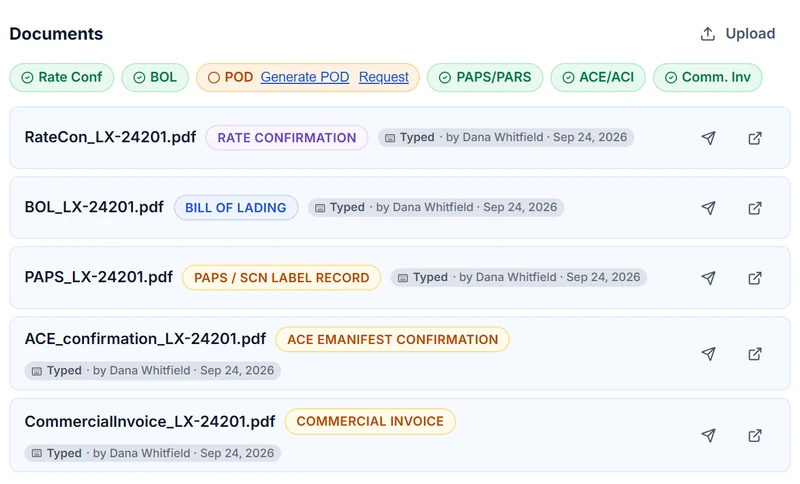
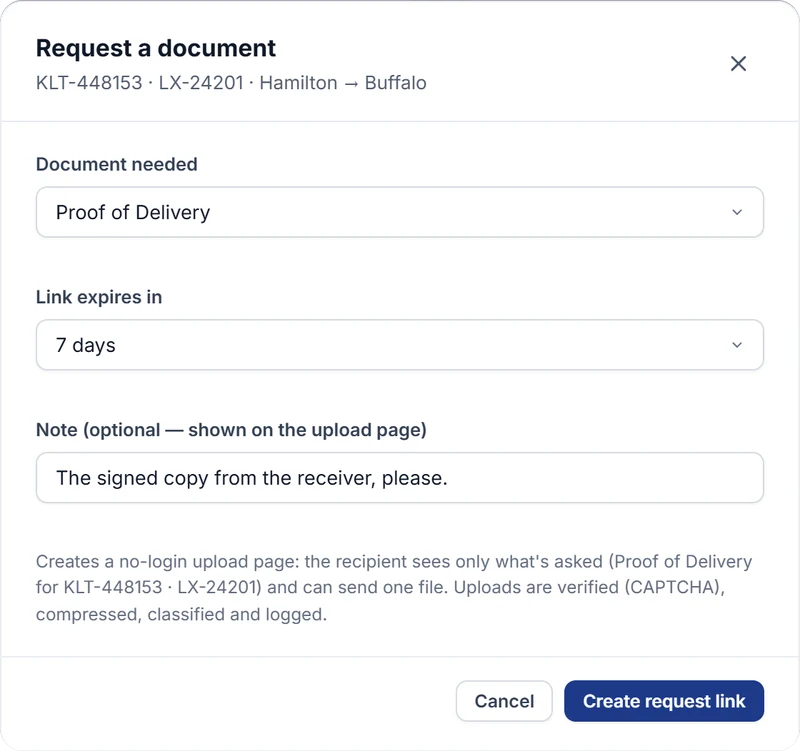
  1. A delivered load's documents: rate con, BOL, PAPS, ACE and commercial invoice on file, the POD missing with Generate and Request links (demo data)Request a document: Proof of Delivery for KLT-448153 · LX-24201, Hamilton to Buffalo, link expires in 7 days, note "The signed copy from the receiver, please." (demo data)

    Ask from the load

    A missing POD shows on the load. One click makes a no-login upload link, with a note for the driver. It expires when you say, or as soon as it's used.
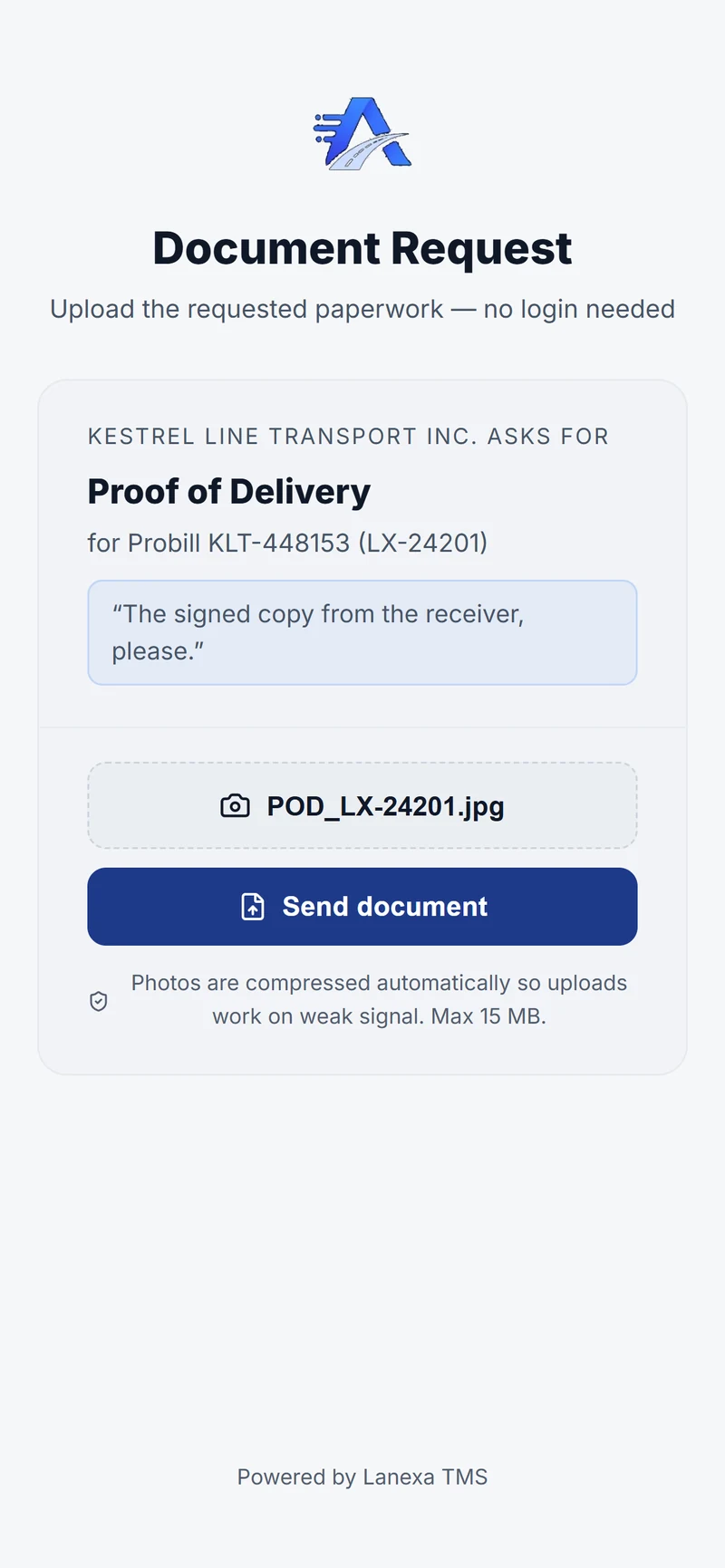
  2. The driver's phone: Kestrel Line Transport asks for the Proof of Delivery for probill KLT-448153, no login needed; the POD photo is chosen and ready to send (demo data)

    The driver sends a photo

    The link opens in the phone's browser. No app, no login. Photos are compressed on the phone, so they send on a weak signal.
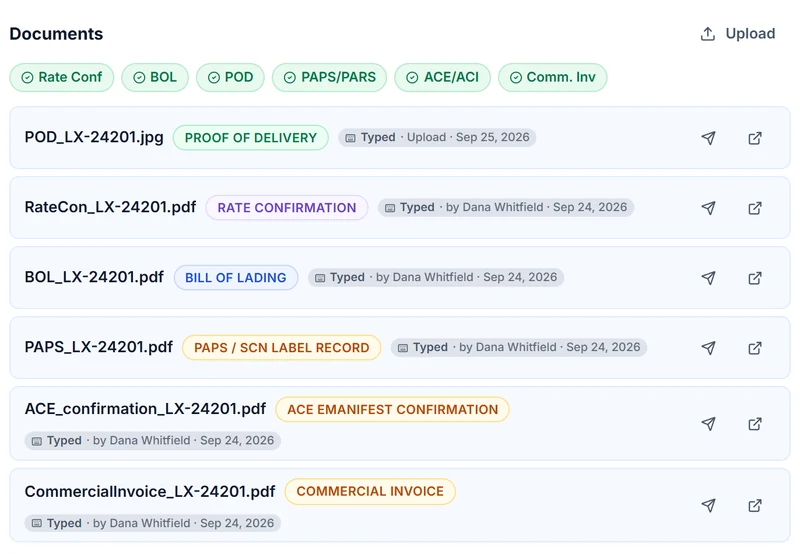
  3. The POD photo from the driver, filed on the load; every required document marked on file (demo data) POD on file

    It files itself on the load

    The POD lands on the load it belongs to, next to the BOL and the customs papers, with how it came in and when.

On every plan: documents, request links and a customer tracking link. No separate document app to connect or pay for. Send the link by text or WhatsApp from Lanexa (Start and up), or copy it into any message.

See documents

Built in. Nothing to bolt on.

Turn a card over for the detail.

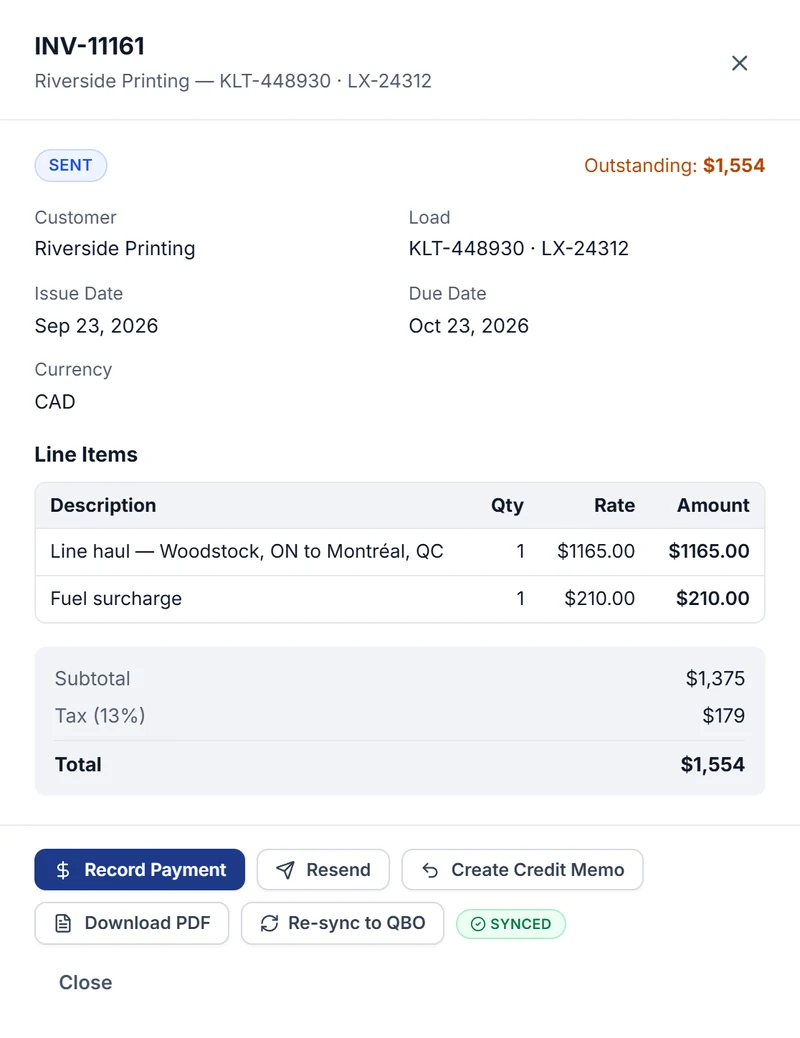
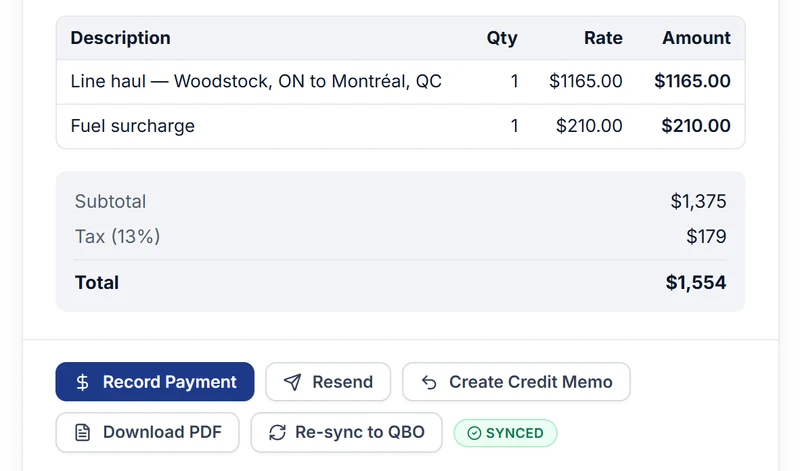
  • An invoice with its line items and total, marked Synced to QuickBooks Online (demo data)Synced to QuickBooks Online
    Name

    Works with QuickBooks Online®

    Plans:StartFleetEnterprise

    Works with QuickBooks Online®

    Invoices, payments and carrier bills go into QuickBooks Online when you press send.

    Your accountant sees them in the books they already use.
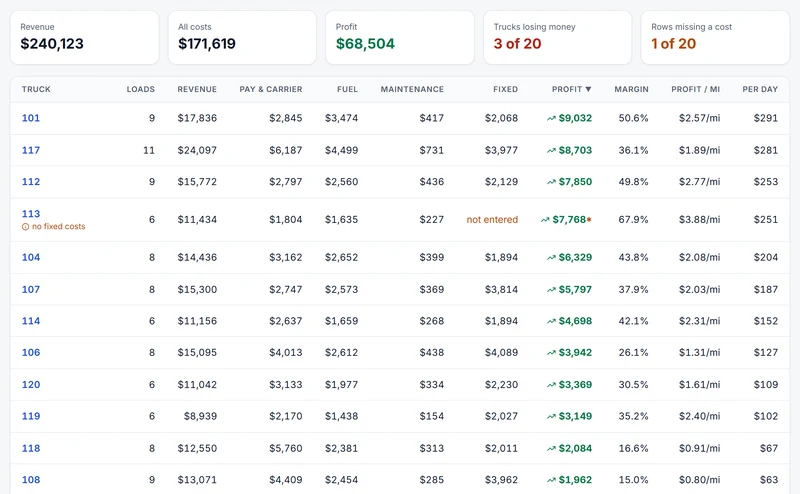
  • Truck profitability: revenue, pay, fuel, maintenance and fixed costs against each truck, with profit, margin and profit per mile (demo data) Every cost against every truck
    Name

    True cost of every truck

    Plans:Every plan

    True cost of every truck

    Revenue each truck earned, less driver pay, carrier costs, fuel, maintenance and its share of what it costs to own: payment, insurance and plates.

    A truck with a cost missing is flagged, never scored as free. Every load shows its rate per mile when you book it.
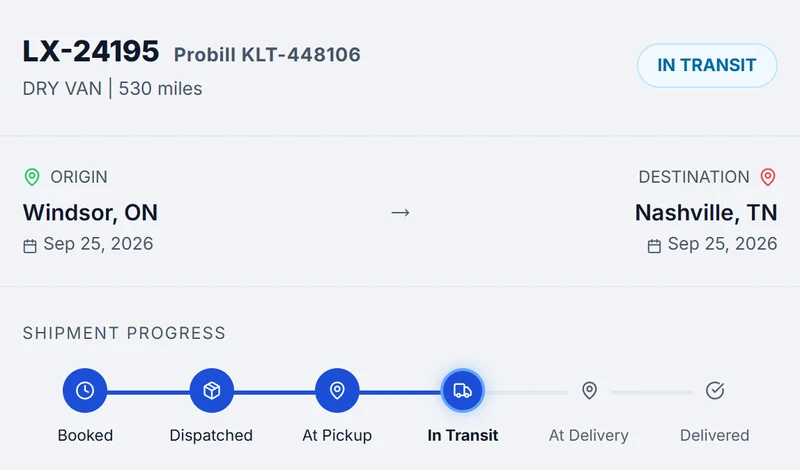
  • Public tracking card: a load in transit, with origin, destination and progress (demo data) Tracking link, no login
    Name

    Customer tracking, built in

    Plans:Every plan

    Customer tracking, built in

    A tracking link is built in on every plan: your customer checks a load’s status without an account. Nothing extra to buy.

    Documents are built in too, from the rate confirmation to the POD, with a version history on regenerated invoices and BOLs.
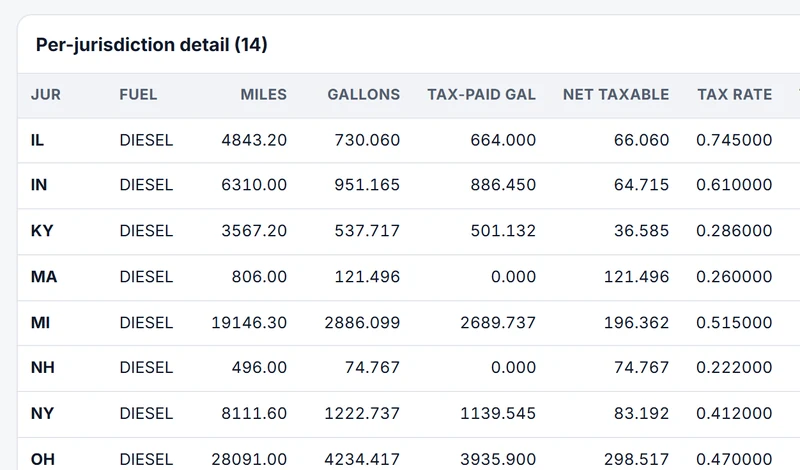
  • IFTA per-jurisdiction detail: miles, gallons, tax-paid gallons, net taxable and rate (demo data) Q3 · 14 jurisdictions
    Name

    IFTA, even for one truck

    Plans:Every plan

    IFTA, even for one truck

    Miles by province and state, the tax, the return and the audit exports, on Solo too.

    Solo takes the miles you enter. Higher plans fill them from routes and ELDs.
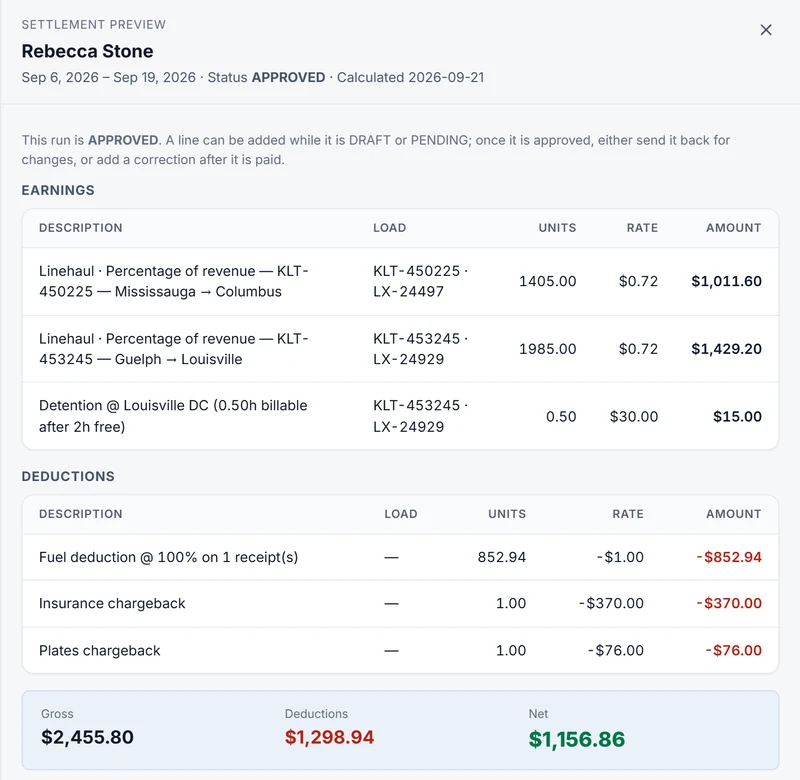
  • One driver's settlement: linehaul and detention earnings, fuel and chargeback deductions, then gross, deductions and net (demo data) Earnings, deductions, net
    Name

    Driver pay and settlements

    Plans:StartFleetEnterprise

    Driver pay and settlements

    Settlement runs calculated from delivered loads and trips, with itemised pay lines, two-person approval and a statement for every driver.

    Earnings and deductions are previewed before approval, and every extra line carries a reason.

  • Two trucks on a highway climbing into the hills Your spreadsheets, imported for you
    Name

    Switching is easy

    Plans:Every plan

    Switching is easy

    Send your spreadsheets, in any format, to support@lanexa.io and we map and import them for you.

    Loads and customers land on the same record everything else uses.

Where your day goes, handled.

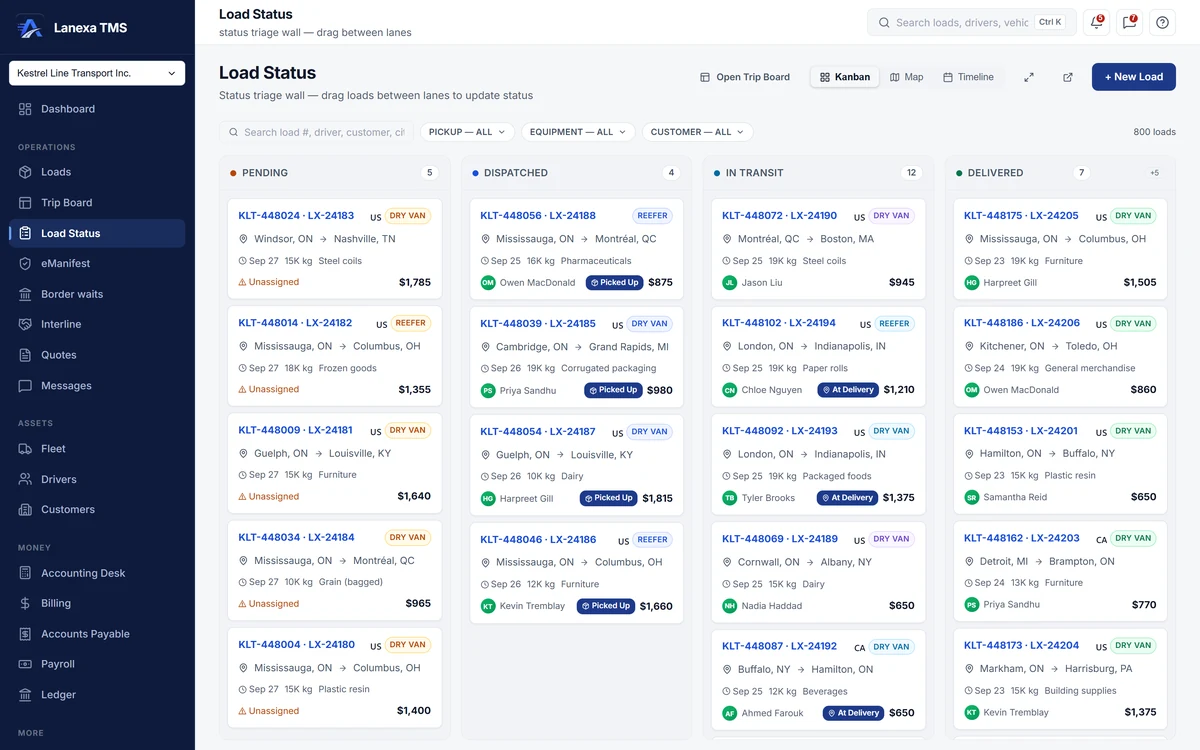
Book once. Dispatch from the same record.

  • Dispatch board, Trip Board and load grid
  • Kanban, map and timeline of every load
  • Split a load at a cross-dock

PlanStart and up

See how it works

app.lanexa.io
Load Status board with loads in Pending, Dispatched, In Transit and Delivered lanes (demo data)
  1. Drag a load to its next status
  2. The same loads on a map or a timeline

The crossing, planned before the truck rolls.

  • Live CBP and CBSA booth waits
  • ACE and ACI packet, ready to file
  • Broker, PARS and PAPS on the load

PlanWaits on every plan · Border Desk on Fleet
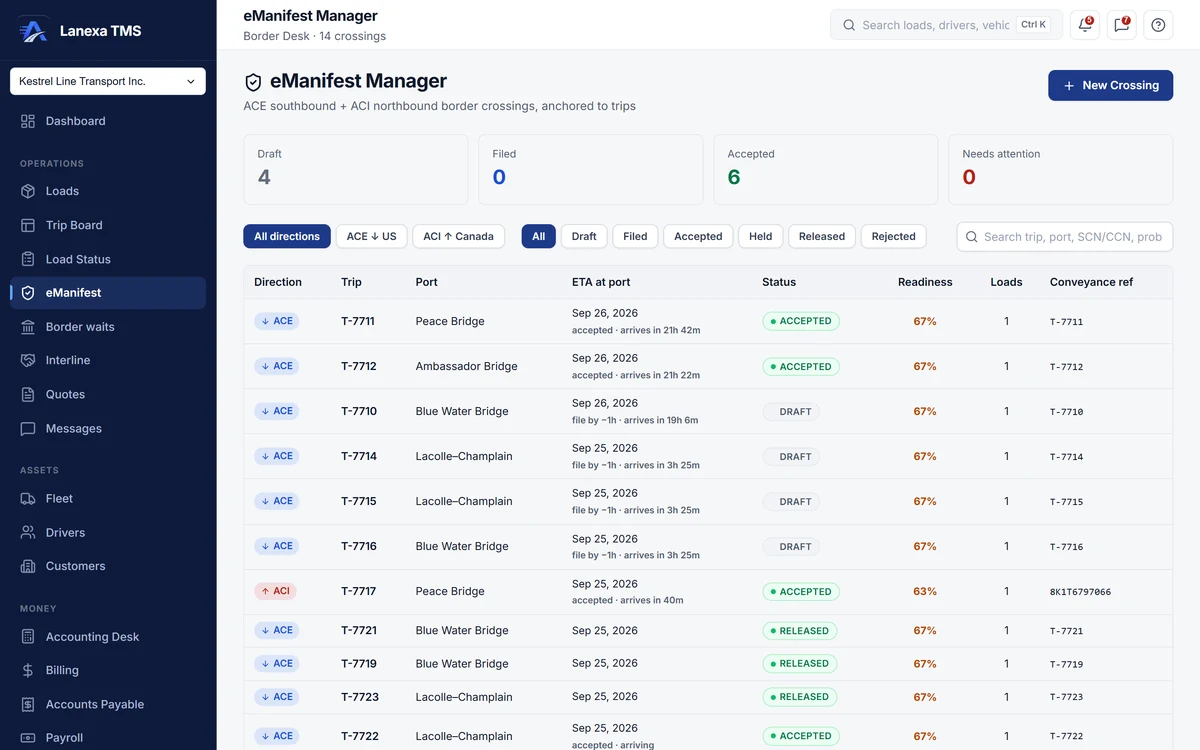
See how it works

app.lanexa.io
eManifest Manager listing ACE and ACI crossings with port, ETA, status and readiness (demo data)
  1. Readiness checked before the truck rolls

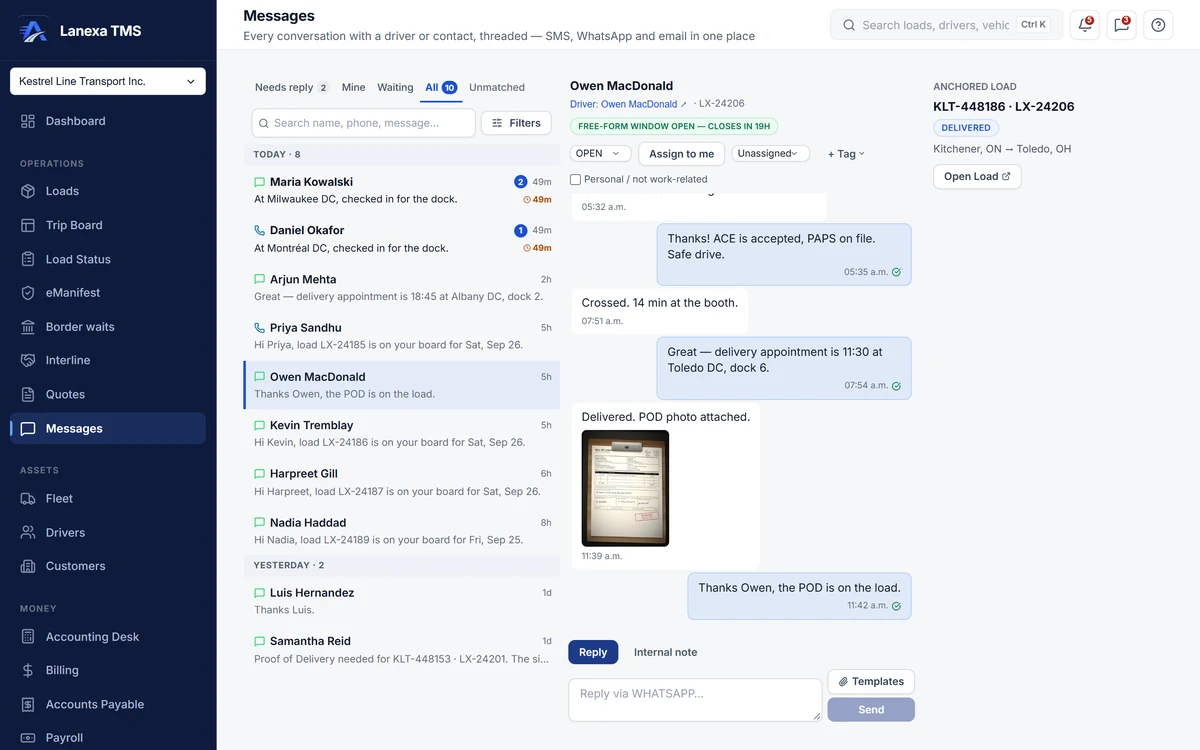
Drivers answer in the app they already use.

  • No driver app to install
  • SMS on your company number
  • WhatsApp for your fleet, as an add-on

PlanStart and up

See how it works

app.lanexa.io
A driver's WhatsApp thread inside Lanexa, on the delivered load: seal number, border crossing, and the signed POD photo (demo data)
  1. Driver replies land on the load

Every paper on the load it belongs to.

  • Rate con, BOL, POD and customs papers on the load
  • Ask for a missing one with a no-login link
  • Required documents checked before invoicing

PlanEvery plan · invoice rules from Start
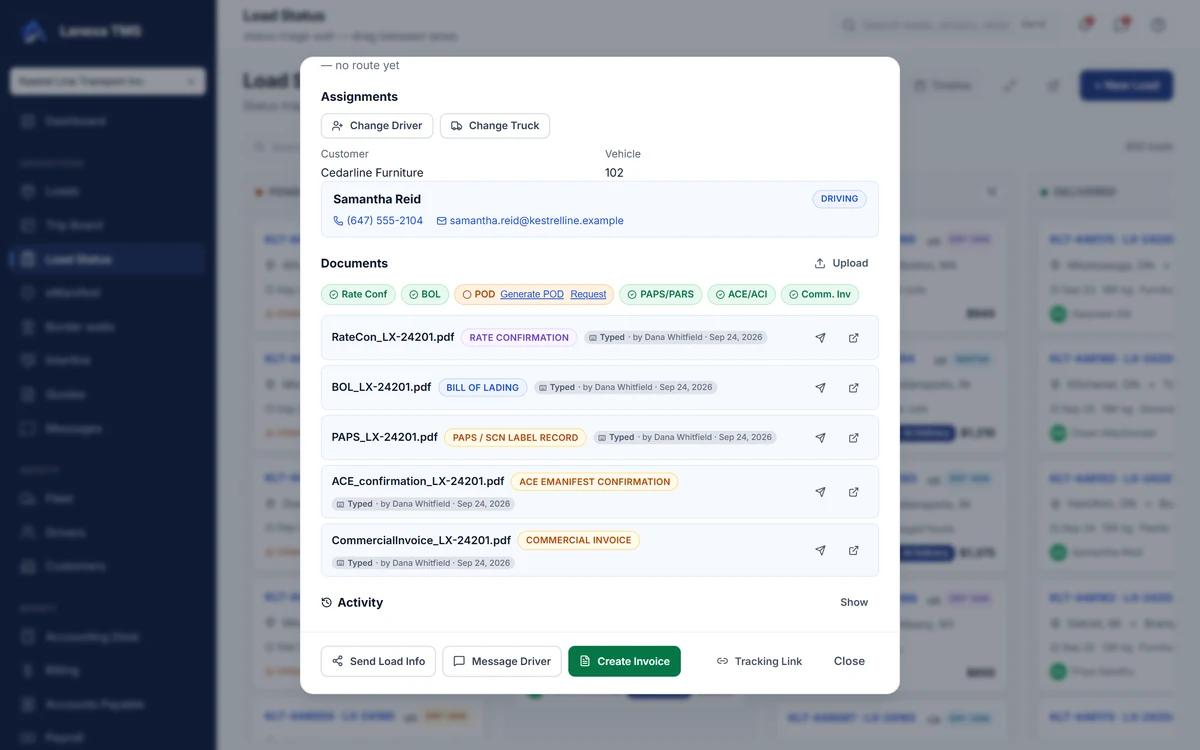
See how it works

app.lanexa.io
A delivered load's documents in Lanexa: rate con, BOL, PAPS, ACE and commercial invoice on file, the POD still missing with a Request link (demo data)

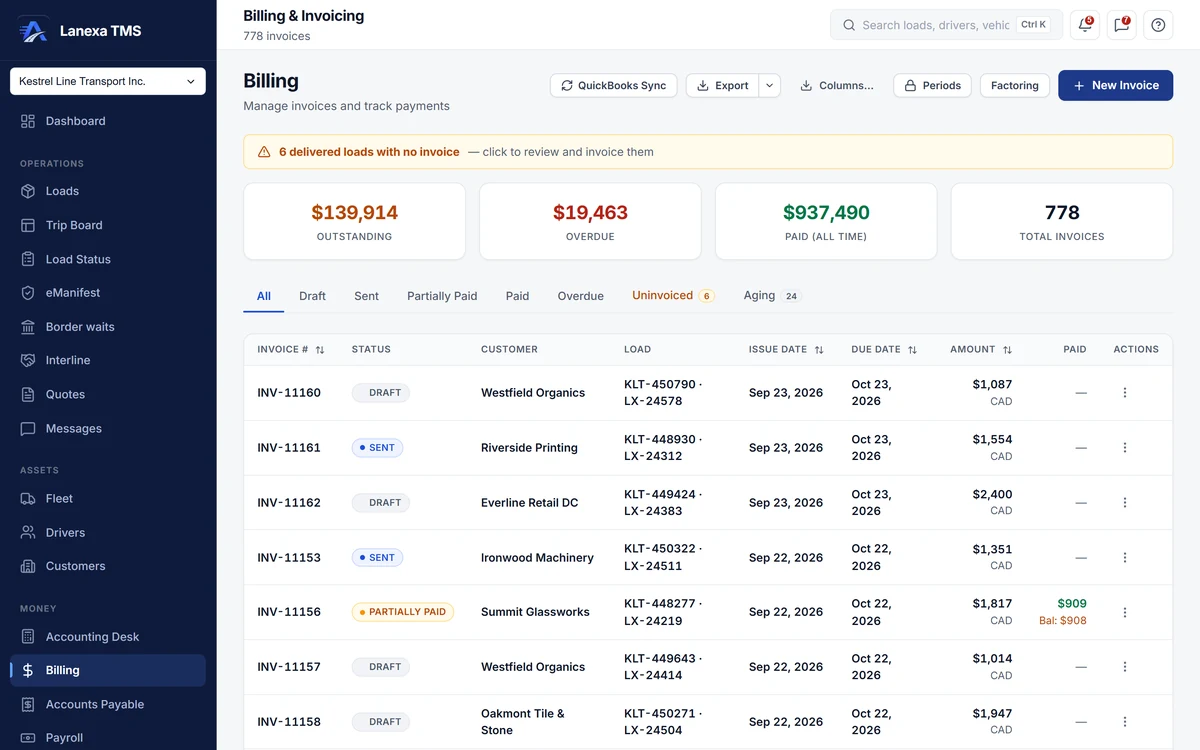
Delivered today. Invoiced today.

  • Marking delivered writes the invoice
  • Province tax and fuel surcharge applied
  • Pushed to QuickBooks Online

PlanInvoicing on every plan · QuickBooks on Start
See how it works

app.lanexa.io
Billing and invoicing: outstanding, overdue and paid totals, the QuickBooks Sync button and the invoice list (demo data)
  1. Push invoices to QuickBooks Online

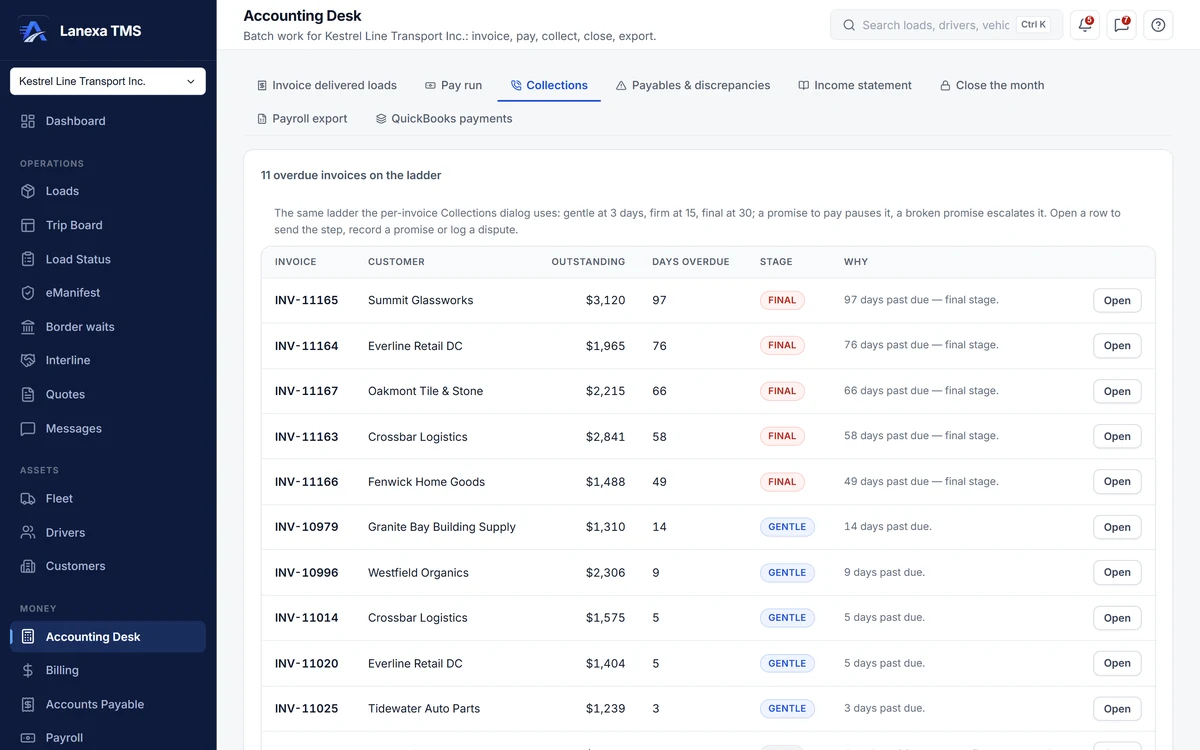
Collect, pay drivers, close the month.

  • Collections desk and statements
  • Driver pay built from the loads that ran
  • General ledger and cash forecast

PlanPay on Start · ledger on Fleet

See how it works

app.lanexa.io
Collections ladder: overdue invoices with days overdue and a gentle, firm or final stage (demo data)
  1. A collections ladder: gentle, firm, final

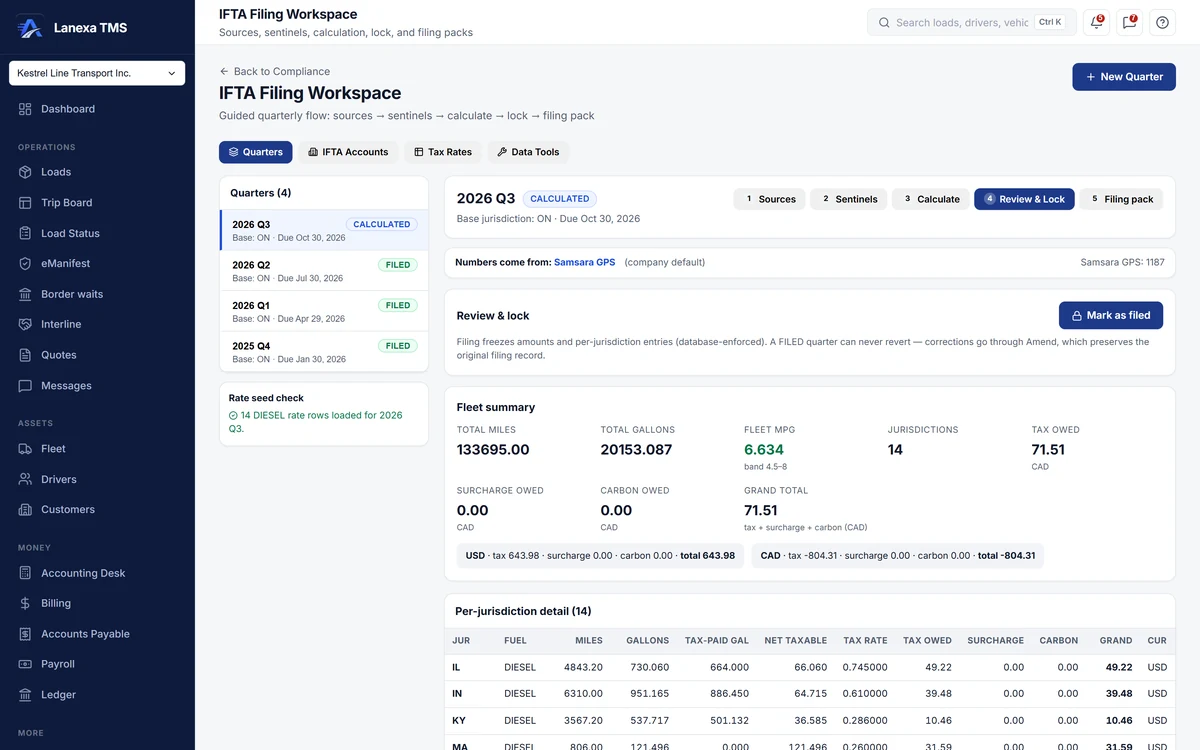
The IFTA quarter, already assembled.

  • Complete IFTA workspace
  • Gap and variance checks before you file
  • Audit-Armor report

PlanEvery plan, even Solo

See how it works

app.lanexa.io
IFTA filing workspace: the quarter calculated from GPS miles, with fleet MPG and tax owed (demo data)
  1. Five steps from miles to the filing pack

Keep the apps you already use.

Drivers live in WhatsApp.

The assignment goes out with the load summary PDF, and document requests and status checks arrive with quick-reply buttons. Everything a driver sends lands on the load it belongs to, in the office.

An add-on on Start and Fleet, included on Enterprise. North American phone numbers.
See Messages

Invoice INV-11161 for Riverside Printing in Lanexa: line items, 13% tax, total $1,554, marked Synced to QuickBooks Online (demo data)
QuickBooks OnlineSent from Lanexa
  • InvoiceINV-11161Riverside Printing$1,553.75 Synced
  • PaymentINV-11079Oakmont Tile & Stone$1,876.00 Synced
  • Carrier billB-7734Lakehead Haulage$2,186.55 Synced

Demo company · one way, Lanexa to QuickBooks

Your books stay in QuickBooks.

Invoices, payments and carrier bills go into QuickBooks Online when you press send. It sends one way, from Lanexa into QuickBooks.

On Start, Fleet and Enterprise.

How the QuickBooks link works

Built for fleets and brokers.

Customers, quotes and partner carriers on the same record as the load, so the price, the haul and the margin never drift apart.
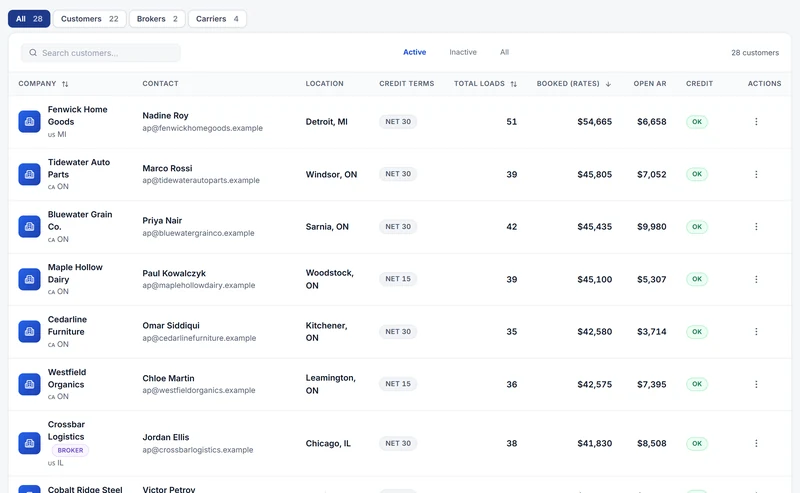
  • Customers ranked by booked revenue, with contact, credit terms, loads, open receivables and credit status (demo data)
    Every plan

    One book of everyone you deal with

    Shippers, brokers and carriers on one record, with contacts, terms, credit limits and what they owe, worked out from live invoices.

    See customers
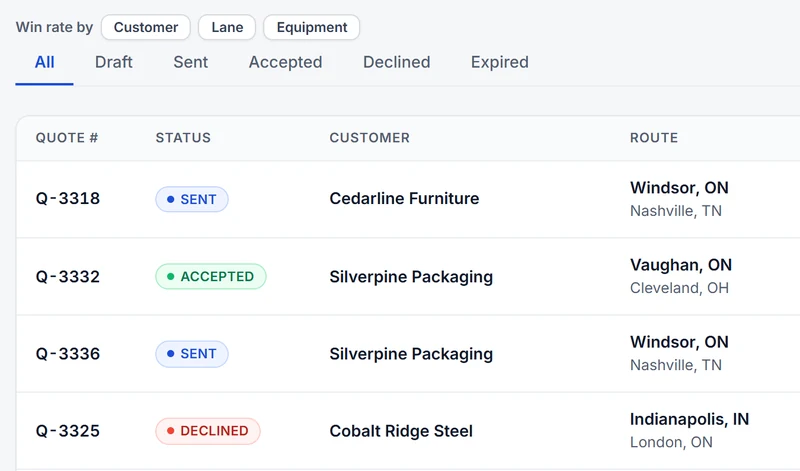
  • Quotes filtered by status, with customer, route and win rate by customer, lane or equipment (demo data)
    Start and up

    Quotes your customer accepts online

    Price from your own lane history, email the PDF, and let the customer accept with no account. The accepted quote becomes the load.

    See quotes
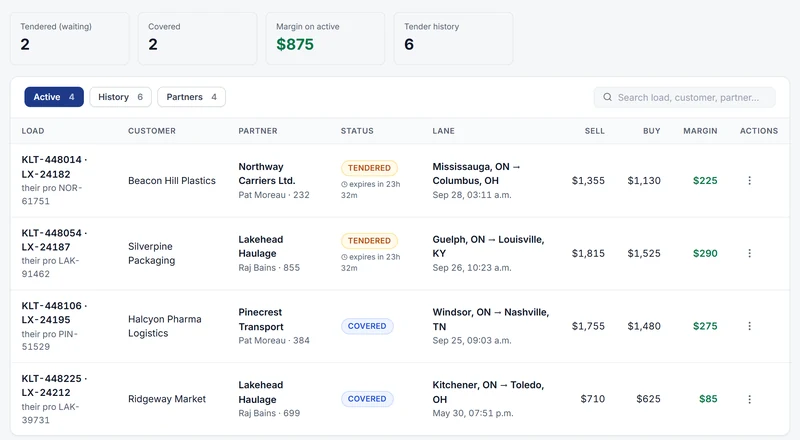
  • Interline desk: loads tendered to partner carriers, with sell, buy and margin on each (demo data)
    Fleet and up

    Hand a load to a partner, keep the margin

    Tender loads to partner carriers, send the rate confirmation, and have the partner's bill raised at delivery with the POD. Sell, buy and margin on every row.

    See interline

Pick your size.

Every price is right here, in Canadian dollars with the US dollar beside it. No sales call, no overage bills.

Early bird: 50% off. 12 months on annual plans, 3 months on monthly plans.

CAD Prices in Canadian dollars. US$ figures are a guide at a fixed 0.70; billing is in CAD.

Plan

Solo

TrucksOne
Office users1

Early bird −50% · first 12 months

$6.25 /month (US$4.38)

$2.50 CAD /month

≈ US$1.75 /month

90 days free, then $30 (US$21) for your first year

  • Renews at $60/year (US$42)
  • You save $45 (US$32) vs monthly

One truck, one person, your own authority. Not a demo.

Start 90 days free

90-day free trial · verify with a card or a driving licence; nothing is charged at signup

What Solo does

  • The full quarterly IFTA workspace
  • Invoices with province tax, drafted on delivery
  • Tracking links customers open without an account
  • Documents, including French invoices, BOLs and PODs
  • Earned per mile, cost per mile and what’s left
  • Live CBP and CBSA border waits
  • FMCSA carrier checks before you book

When you add a second truck, a driver to pay or a border packet, Start and Fleet pick up the same record. Solo for owner-operators

Plan

Start

Trucks2 to 9

Early bird −50% · first 12 months

$149 /month (US$104)

$59.50 CAD /month

≈ US$42 /month

30 days free, then $714 (US$500) for your first year

  • Renews at $1,428/year (US$1,000)
  • You save $850.50 (US$595) vs monthly

Unlimited office users

  • Dispatch board and Trip Board
  • Driver texting on your company number
  • Driver pay and settlements
  • Accounts payable + QuickBooks push
  • Book a load from a rate-con PDF
Start 30 days free

30-day free trial · no card required

Everything in Start
  • Dispatch board, Trip Board, Load Status wall and the spreadsheet load grid
  • Driver texting by SMS on a company phone number
  • Driver pay, settlement runs and payroll export
  • Accounts payable, with carrier bill versus rate-confirmation review
  • QuickBooks Online push — invoices, payments and carrier bills
  • AI rate-confirmation import — upload the PDF, review the pre-filled load
  • Quotes with a public acceptance page, lane pricing and win rate
  • Customer credit gate at booking and an EIA-indexed fuel surcharge
  • Analytics boards, the report builder and a tamper-evident audit log

Up to 9 trucks · Unlimited office users · 250 driver texts a month (soft cap) · 25 AI imports a month · 100 carrier checks a day

Plan

Fleet

Trucks10 and up

Early bird −50% · first 12 months

$499 /month (US$349)

$199.50 CAD /month

≈ US$140 /month

30 days free, then $2,394 (US$1,676) for your first year

$399 (US$279) covers your first 10 trucks, then $40 (US$28) per active truck

  • Renews at $4,788/year (US$3,352)
  • You save $2,845.50 (US$1,992) vs monthly

A truck parked all month is not billed

  • Everything in Start
  • General ledger + weekly cash forecast
  • Border Desk for ACE and ACI packets
  • Live GPS from Samsara or Geotab
  • Interline, on-call alerts, Ask Lanexa

Your other systems: if your yard, warehouse, repair-shop or 3PL system has an API, we build the connection to your Lanexa records.

Start 30 days free

30-day free trial · no card required

Everything in Fleet
  • General ledger, period close and a weekly cash forecast
  • Payroll ledgers — escrow, loans and charge-backs — and team pay splits
  • Live GPS from a connected Samsara or Geotab account
  • Border Desk — ACE and ACI packets, ready to file
  • Notification rules, an on-call rota and SLA escalation
  • Voice alert calls for critical alerts
  • AI daily brief, and Ask Lanexa — a question in English becomes a governed report
  • Interline desk for work given to partner carriers

CAD $399 (US$279) covers the first 10 trucks, then $40 (US$28) per active truck · An active truck is a power unit on at least one load that month · A truck parked all month is not billed · 5,000 texts fair use · 500 carrier checks a day

No sales call

See the price. Open your account. Talk to us only if you want to.

  1. The price is on this page No “book a demo to see pricing”. No quote to wait for.
  2. Your account in about 3 minutes Ready to use once you confirm your email. No card on Start or Fleet; Solo checks a card or licence and charges nothing.
  3. A product expert, if you ask A walkthrough before your trial or during it. Book one
Enterprise · 50 trucks and up, or several companies · Contact us · pilot, migration and SLA · early bird negotiated per deal

No setup fee · cancel any time · we never charge per user, per load, per driver, or for support

Compare every feature by plan

Works with what you already run.

If your yard, warehouse, repair-shop or 3PL system has an API, we build the connection to your Lanexa records. Fleet and Enterprise.

How each connection works

  • QuickBooks Online®Invoices, payments and carrier bills
  • WhatsAppMessages with your drivers

And the public data it fetches for you

  • FMCSACarrier and broker checks, by DOT, MC or name
  • CBP · CBSACommercial booth wait times, every 30 minutes
  • Bank of CanadaThe CAD/USD rate on cross-border work

Questions carriers ask

What is Lanexa?

Lanexa is a transportation management system for small and mid-sized North American carriers, built in Canada around Canada–US cross-border freight.

It covers quoting, customers, dispatch, trips, fleet and drivers, documents, border paperwork, compliance and IFTA, invoicing, accounts payable, driver pay, the general ledger, analytics and driver messaging — as one shipment record rather than several systems reconciled by hand.

How much does Lanexa cost?

Solo is CAD $5 (US$3.50) a month billed annually, or $6.25 (US$4.38) month to month, for one truck.

Start is CAD $119 (US$83) a month billed annually, or $149 (US$104) month to month, for up to nine trucks with unlimited office users. Fleet is CAD $399 (US$279) a month for the first 10 trucks, then $40 (US$28) per active truck, billed annually ($499 (US$349) and $50 (US$35) month to month). Enterprise is priced by arrangement. Annual billing saves 20%. Prices are in Canadian dollars; US dollar figures are a guide at a fixed 0.70. During the early bird, new customers get 50% off: the first 12 months on annual plans and the first 3 months on monthly plans. Solo’s early bird is on annual billing only, which makes Solo CAD $30 (US$21) for its first year. WhatsApp for your fleet is an add-on on Start and Fleet, and included on Enterprise.

What counts as an active truck on the Fleet plan?

A power unit assigned to at least one load that month, counted nightly.

A truck that sits parked all month is not billed, and trailers are never billed.

Does the cheapest plan include IFTA?

Yes. The complete quarterly fuel-tax workspace is on Solo, CAD $5 (US$3.50) a month billed annually, including the IFTA Audit-Armor report.

Fuel tax is never held back to push an upgrade. Driver texting, driver pay, Border Desk and more office users come with Start and Fleet.

Is there a free trial?

Yes. Solo starts with 90 days free: you verify with a card or a driving licence, and nothing is charged at signup.

Start and Fleet include 30 days free with no card required. When a Start or Fleet trial ends you get seven days read-only, then the account falls back to Solo with every record intact. Nothing is deleted.

Do drivers need to install an app?

No. Drivers work from links and messages in their phone's browser, by SMS, or on WhatsApp with the add-on.

Nothing to download, nothing to update.

8 more questions

Can drivers send documents over WhatsApp?

Yes, with the WhatsApp add-on. A photo a driver sends in a load's thread is filed against that load and waits in a review queue, where someone in the office names it — BOL, POD — in one click.

Does Lanexa connect to QuickBooks?

Yes. From the Start plan, Lanexa sends invoices, payments and carrier bills straight into QuickBooks Online, so your books stay current without retyping.

Does Lanexa work with my ELD?

Yes. On the Fleet plan, Lanexa connects to your Samsara or Geotab account for live GPS positions and, where enabled, hours-of-service clocks and Geotab IFTA distance.

Does Lanexa handle eManifest for border crossings?

Yes. Border Desk, on Fleet, prepares the ACE and ACI packets, the PARS and PAPS references and the broker loop, ready to file, and checks every crossing against the one-hour clock.

Can I move my data in from another system?

Yes. CSV import for loads and customers is on every plan, with column names mapped automatically, and AI rate-confirmation import — upload the PDF, review the pre-filled load — is on Start and up.

Planning a big move? Write to support@lanexa.io and we will help you bring it across.

What happens if I stop paying or need a break?

Nothing is deleted. You can pause for up to 180 days and everything stays readable.

Cancelling from Settings drops you to Solo at the end of the period, and a lapsed trial falls back to Solo too. Every path ends in read-only or a smaller plan.

How does Lanexa fit with my ELD, load boards and accountant?

Lanexa is the TMS in the middle. On Fleet it reads live positions from your Samsara or Geotab account and keeps a real double-entry general ledger, and from Start it sends invoices, payments and bills to QuickBooks Online for your accountant.

Load board integration is coming in the next upgrade.

Is my company's data kept separate?

Yes. The database itself keeps every company’s data apart, on every request, and your most sensitive records, such as connection credentials and identity documents, cannot be reached from a browser at all.

Card numbers never touch Lanexa; they go straight to the payment processor.

Book the load. The rest follows.