eManifestEvery crossing ready before the booth.
A truck that reaches the booth before its manifest is accepted does not cross.
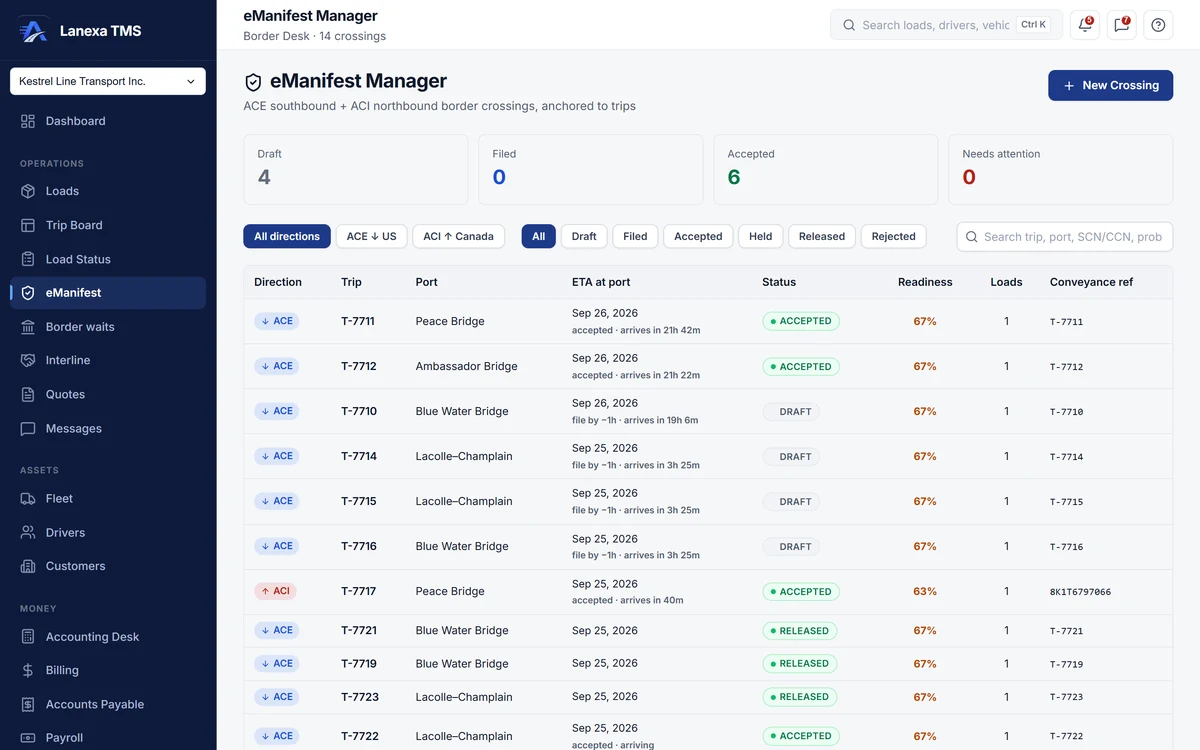
- Readiness checked before the truck rolls
What it does
One checklist instead of five screens
The driver's travel documents, the truck's VIN and plate, each load's cargo details, your SCAC and CBSA carrier codes and the customs broker come together against one trip. The crossing gets a readiness score from 0 to 100%, and every failed item links to the screen that fixes it.
Southbound and northbound, checked differently
ACE into the US asks for crew identity for everyone in the cab and rejects vague cargo descriptions. ACI into Canada asks for no driver data but holds strict control-number formats and a 300-character description limit. Each crossing is checked against its own direction's rules.
The one-hour clock
Every crossing carries a countdown to the moment its manifest must be accepted, one hour before arrival. It turns amber as the deadline nears and red inside the window, and dispatch is alerted as the truck gets close without an accepted filing.
The customs broker loop
Send the broker a pre-written packet with the PARS or PAPS number, route, commodity, weight, piece count, port and ETA, with the load's commercial invoice and BOL attached. Track each shipment from packet sent to acknowledged to entry on file, so the driver does not commit to the port before the broker is ready.
Paper the driver carries
Print a lead sheet with a scannable barcode, PARS and PAPS label sheets, and a driver crossing packet with an at-the-booth checklist for the direction being crossed. Or send the packet to the driver's phone as a 30-day link that you can revoke from Documents.
Ready to file
The Filing Assistant lays out every value the ACE or CBSA eManifest portal asks for, in the portal's own order, with a copy button per field and per section. Mark the crossing filed, and record accepted, held and released as the portal reports them.
The detail, when you want it
Everything live in eManifest12
- Draft, filed, accepted and needs-attention counts at the top of the desk
- Direction and status filters, plus search by trip, port, probill or control number
- The live booth wait at the crossing's port on every row
- A warning that lists cross-border loads with no customs broker
- ACE trip numbers and ACI conveyance references reserved in one click and never reused
- Shipment control numbers derived from the probill in one click
- Crew identity checked only southbound, where ACE requires it
- Vague cargo descriptions flagged before the portal rejects them
- Empty crossings released straight from draft
- A filing history of every status change, who made it and when
- Released crossings written onto each load's journey
- A paper-fallback playbook for CBSA outages on northbound crossings
Which plan includes itBorder Desk — crossings, readiness checks, conveyance and control numbers, the Filing Assistant, driver paper and the customs broker loop — is on Fleet and up.
Live CBP and CBSA border wait times are on every plan, including Solo. Your SCAC and CBSA carrier codes and the customs-broker directory are kept in Settings from Start. Compare plans
How we count273 live capabilities of 283 catalogued.
Each capability is one control, field, tile, column or disclosed number, counted one by one. The registry
How does Lanexa help me file my ACE or ACI eManifest?
Border Desk prepares the whole crossing, ready to file: the checked data, the conveyance and control numbers, the driver's paper and the broker's packet.
The Filing Assistant lays every value out in the ACE or CBSA eManifest portal's own order with copy buttons, and you mark it filed in Lanexa and record what the portal reports.
Which plan includes Border Desk?
Border Desk is on Fleet and up. Live CBP southbound and CBSA northbound commercial booth wait times, refreshed every 30 minutes, are on every plan, including Solo, on their own page and on the dashboard.
How does my driver get the crossing paperwork?
Print the lead sheet, the PARS or PAPS labels and the driver crossing packet, or share the packet to the driver's phone as a link that lasts 30 days.
The driver opens it in a phone browser; there is no app to install.