BillingDelivered today, invoiced today.
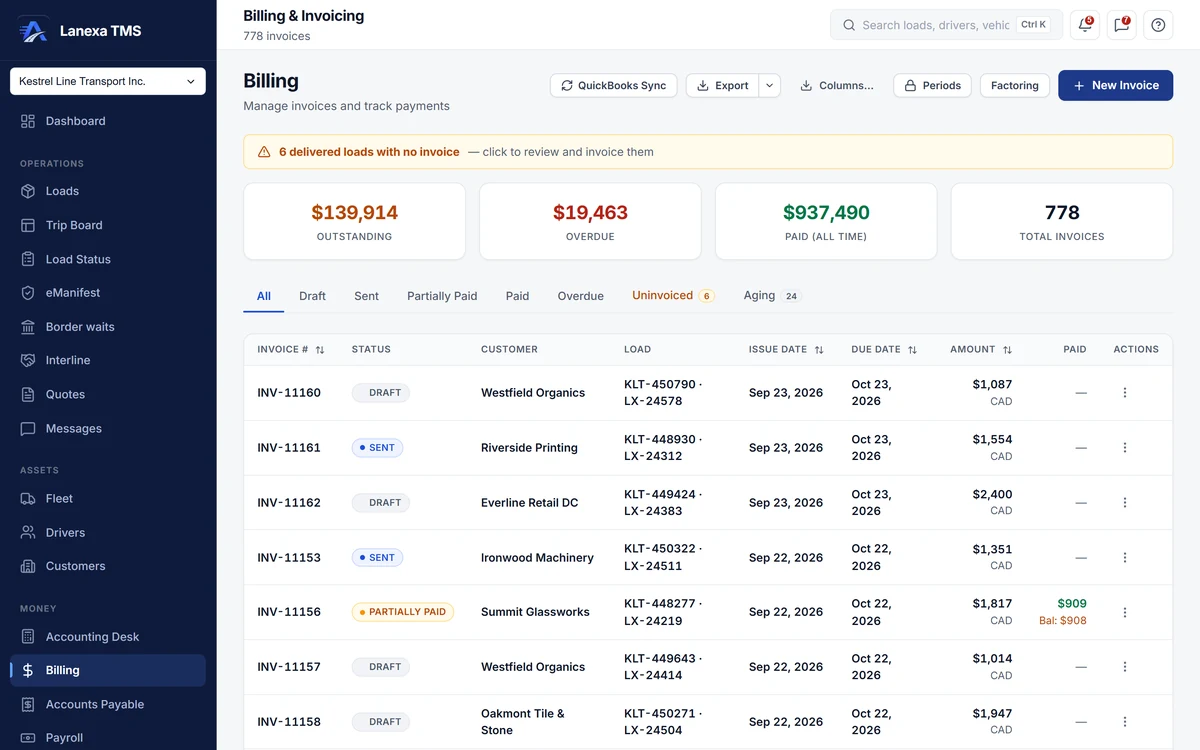
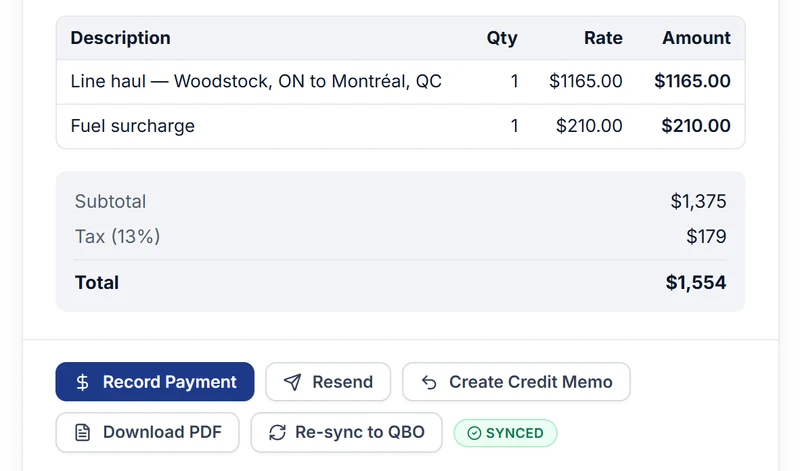
Most invoices in Lanexa are never typed: marking a load delivered writes the draft invoice in the same transaction, with sales tax from the destination province and your customer's fuel surcharge.
- Push invoices to QuickBooks Online
What it does
Delivery writes the invoice
Marking a load delivered stamps the delivery and writes a draft invoice in one transaction, with the next number in your sequence, tax resolved from the destination province and your customer's fuel surcharge priced from their schedule. If a required POD or document is missing, the invoice waits and the reason is recorded.
No delivered load left unbilled
A standing banner counts delivered loads with no invoice, and the Uninvoiced tab creates one in a click, flagging loads whose paperwork is incomplete. An invoice created with no tax rule for its destination says so plainly before it is sent.
Send the whole packet
Email the invoice with its bill of lading and proof of delivery — optionally combined into one PDF — plus up to eight catalogued documents. An exact copy of what was sent is archived, so a reprint can always be told apart from the original.
Detention you would otherwise lose
A radar compares real dock times against each customer's free hours and hourly rate, and bills the detention in one click. Confirmed detention and charges quoted to the customer ride onto the next invoice automatically.
Collect, correct, close
Age receivables by customer and currency, print statements, and draft reminders that go gentle, firm and final — nothing is sent automatically. Voids and credit memos need a written reason, financial fields freeze three days after an invoice is committed, and a closed month stays closed.
Factoring built in
Record your factor once, and invoices for customers with a notice of assignment carry the factor's remit-to from the moment they are created. Submit a schedule of accounts, mark it funded at the advance and fee, charge back an item, and see what the factor still needs before you submit.
The detail, when you want it
Everything live in Billing12
- Outstanding and overdue totals at the top of the invoice book
- Status tabs, an aging tab and per-currency footer totals
- Invoice numbers from your own template, assigned by the server
- Build an invoice by hand from freight, accessorial and fuel-surcharge lines
- Payments by cheque, ACH, wire, card or cash, with short-pay reason codes
- Credit memos cross-referenced to the invoice they correct
- A void refused on a paid or part-paid invoice
- Customer statement PDFs per customer and currency
- Invoice PDFs in French or English (Québec Bill 96)
- Excel or CSV export of the invoice book
- Every invoice and payment written onto the load's timeline
- One-way push of issued invoices to QuickBooks Online
Which plan includes itInvoicing is on every plan, including Solo: automatic invoices on delivery, the invoice book, sending with the document packet, payments, voids and credit memos, collections and statements, detention capture and factoring.
Solo sends up to 50 document emails a month. Batch invoicing, month-end period locks, the EIA-indexed fuel surcharge and QuickBooks Online push are on Start and up. Compare plans
How we count180 live capabilities of 182 catalogued.
Each capability is one control, field, tile, column or disclosed number, counted one by one. The registry
Do I have to create invoices by hand?
Usually not. Marking a load delivered writes a draft invoice in the same transaction, with tax from the destination province and the customer's fuel surcharge; you review and send it from Billing.
If the customer requires a POD or other documents that are not on file, the invoice waits and the activity log says exactly why.