LedgerBooks that post themselves and prove they tie.
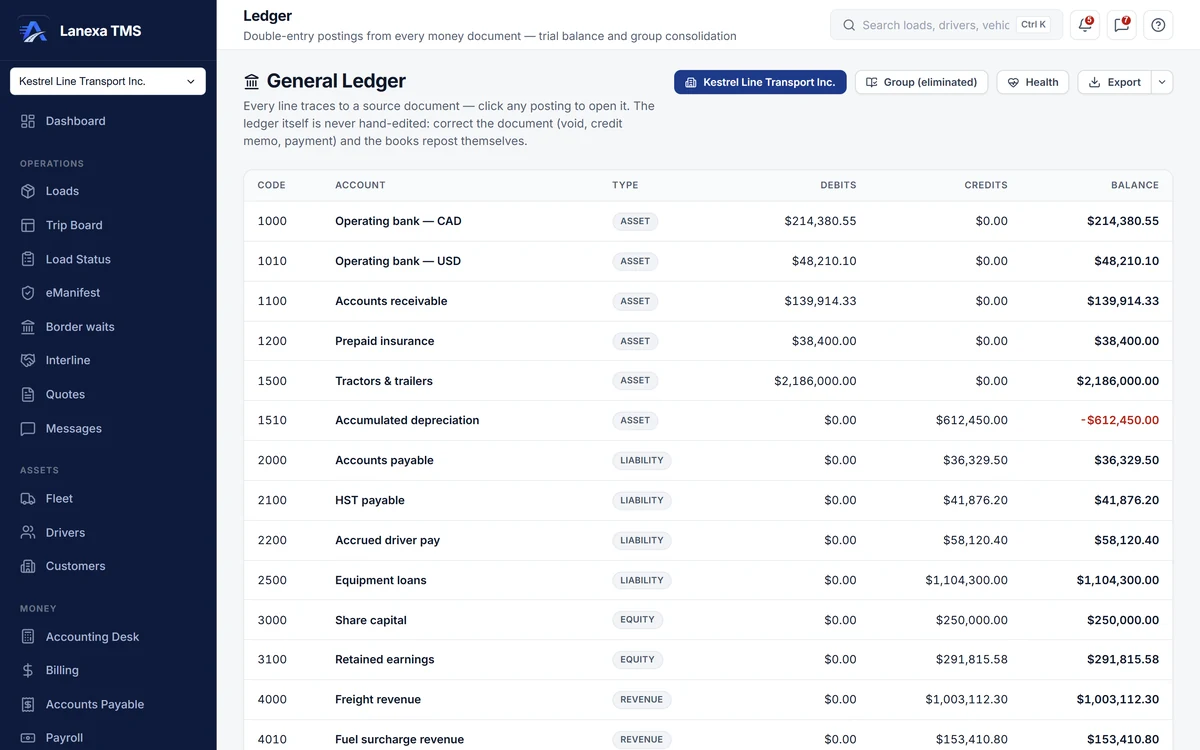
The Ledger is your company's own double-entry books.
What it does
The books post themselves
Invoices, payments, approved carrier bills, paid settlements, verified fuel receipts and filed IFTA quarters each post their own debits and credits. Void, cancel or delete the document and its postings come back out. Nobody hand-edits a posting: to correct the books, you correct the document.
A trial balance you can click through
Balances read the way an accountant expects, in account order. Click an account for its postings, then click a posting to open the invoice, bill or settlement that produced it. US-dollar postings show their CAD equivalent at the rate that was booked.
Eight checks that the books tie
The health view checks that every document balances, that the ledger ties to receivables and payables, that paid amounts are backed by payment records, that settlements equal their lines and that invoice arithmetic is right to the cent. A red check opens the exact records that disagree.
A weekly cash forecast
Open invoices by the week they fall due, against approved carrier bills and approved driver pay, with the net and a running total that turns red when cash would run short. Past-due weeks are marked. It shows what is booked, not what is promised.
One view across a group of companies
The Group (eliminated) view is a consolidated trial balance: all companies, the intercompany business between them, and the consolidated balance with that business eliminated, so a load farmed out to a sister company is not counted twice.
Early warnings
Days sales outstanding per company, and flags for an invoice far above a customer's usual, a possible duplicate carrier bill and an unusually large settlement. The flags suggest; they never block.
The detail, when you want it
Everything live in Ledger12
- Company, group and health views on one screen
- Balances shown in the normal sign for each account type
- Negative balances highlighted
- Intercompany postings badged in the account drill
- The books refresh live as postings change
- Trial balance export to Excel or CSV, for the company or the group
- A three-sheet health workbook: checks, cash forecast and flags
- Every export recorded in the activity log
- Filed IFTA quarters post their fuel tax payable
- A chart of accounts managed in Settings: add, archive, reactivate
- An income statement on the Accounting Desk
- A hard-closed month freezes its documents, and so its postings
Which plan includes itThe general ledger — the trial balance, the eight health checks, the weekly cash forecast, the chart of accounts and the Accounting Desk income statement — is on Fleet and up.
The Group (eliminated) view consolidates the companies in a multi-company group, which is an Enterprise feature. Compare plans
How we count107 live capabilities of 120 catalogued.
Each capability is one control, field, tile, column or disclosed number, counted one by one. The registry
Can I post a journal entry?
No, by design. Every posting is written by the document behind it, so the ledger cannot drift from the paperwork.
If a number is wrong, void the invoice, issue the credit memo or record the missing payment, and the ledger reposts itself.
How does the group view avoid counting the same load twice?
When one company in a group farms a load out to another, it is revenue in one set of books and a cost in the other.
The Group (eliminated) view shows the all-companies total, the intercompany amount and the consolidated balance with that intercompany business taken out.
Does the Ledger replace QuickBooks?
No. QuickBooks stays your accountant's statutory book; the Ledger is the operational one, built from the documents as they happen.
On Start and up, invoices, payments and carrier bills also push one way into QuickBooks Online.