ActivityWho changed what, from what, and when.
When someone asks who changed a delivery date, who took a driver off a run or who gave the new bookkeeper access, the record itself only shows how it looks now.
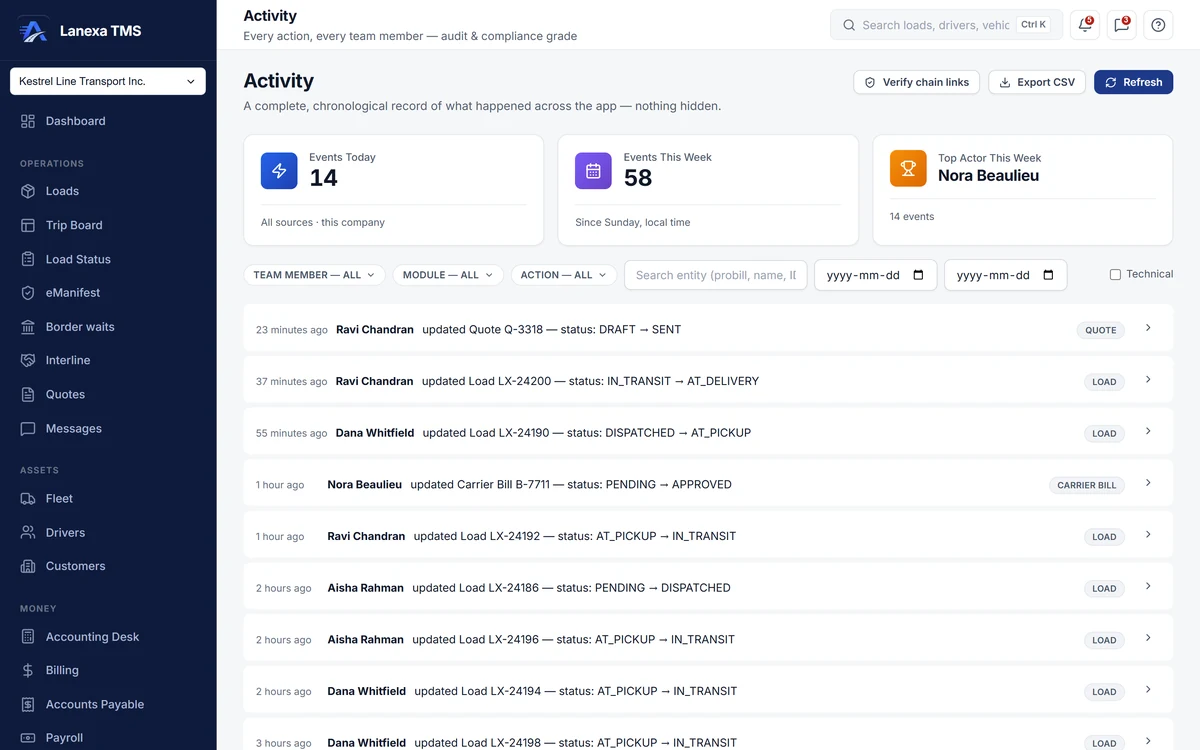
- Who changed what, from what, and when
- A tamper-evident trail you can check
What it does
Recorded without anyone remembering to
Every create, update and delete on loads, trips, invoices, payments, carrier bills, drivers, vehicles, documents, company settings and dozens more is written with a before and after of each changed field. A save that changes nothing writes nothing.
Tamper-evident by design
The trail can only be added to, and an administrator can run a check that reports any altered, deleted or out-of-order entry, so any alteration is detectable.
Unverified is labelled unverified
A change made by a signed-in person carries the identity from their sign-in. Events reported by the browser carry only a claim, so they are marked Unverified and hidden by default; only an administrator can switch them on.
Each role reads its own part
Administrators and controllers read the whole trail. Accounting reads the money part — invoices, payments, bills, settlements, driver pay and the ledger — and Safety reads the compliance part. The narrowing happens before anything is fetched, and the header says which part you are reading.
Find one change fast
Filter by team member, module, action — created, updated, deleted or refused — free text such as a probill number, and a date range. Expand any line for the full before and after, or start from the activity panel on a load or a trip.
Take the evidence with you
Export the filtered trail to CSV, in the same order as the screen, with the full date and year on every line. Exporting the trail is itself recorded, and the same trail runs as the Activity / Audit Log report in Reports.
The detail, when you want it
Everything live in Activity12
- One plain-English sentence per event: who, what changed from what to what, and when
- The three most important changed fields shown inline
- Anything that looks like a password or key redacted from the detail
- Refused changes recorded as warnings, with a coloured edge
- Events today, events this week and the week's busiest person at a glance
- Ordered by when things happened, not when they were written
- Load more without skipping or repeating entries
- Refreshes every 60 seconds while the tab is open
- The last 20 events for one load or trip, on the record itself
- The company named on every line when you view all companies
- A Settings tab listing deletions, restores and permission changes
- A link from a record's panel that opens the full trail already filtered
Which plan includes itActivity and the Audit Trail tab in Settings are on Start and up.
Opening them needs the audit permission, which the Company Administrator, Controller, Accounting and Safety & Compliance roles hold by default. The chain check and the Unverified switch are for administrators. On Solo, changes are still recorded; the Activity screen is not part of the plan. Compare plans
How we count68 live capabilities of 80 catalogued.
Each capability is one control, field, tile, column or disclosed number, counted one by one. The registry
Can the activity trail be altered?
No. Entries cannot be edited or deleted through Lanexa, and the administrator's check reports any alteration made to the stored data.
The trail is tamper-evident: any alteration is detectable.
Is every entry tied to a named person?
Changes made by a signed-in person carry that person's identity, taken from their sign-in rather than from the browser.
Events the browser reports about itself can only claim who sent them, so they are marked Unverified and hidden unless an administrator turns them on. Automatic events are labelled System.
Who can read the activity trail?
People whose role includes the audit permission.
Administrators and controllers see everything; the Accounting role sees the money part and Safety & Compliance sees the compliance part. Activity is on Start and up.